NEW MEMBERS:


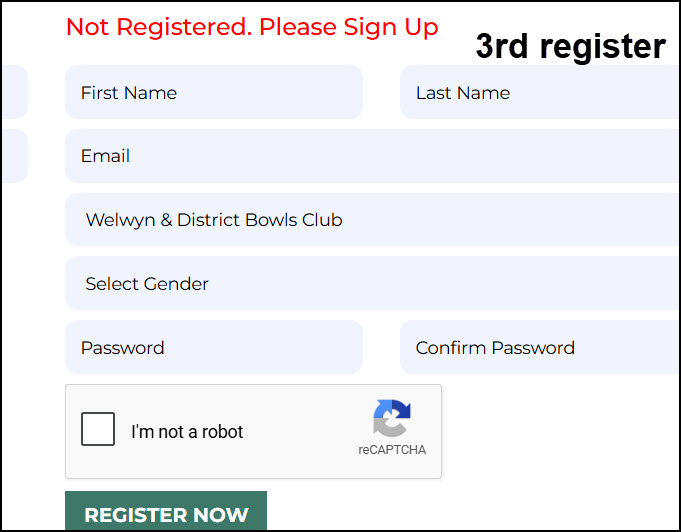
4TH email rinkbooking@welwynbowls.co.uk to let Chris know that you have reistered; he will then approve your register
Six rinks will normally be available for competitive play during all playing sessions, subject to the following rules on allocation of rinks.
Casual play is possible if rinks are available, subject to allocation rules below. A member may book and use a rink for casual play, but must give way to higher priority matches as required.
Allocation of Rinks:
Specific rinks cannot be booked on the Online Booking System, you should select the highest slot available and the priority on the day/time is given from Slot 1 down.
Rink precedence is to be given to matches in the following order:
- Club Hosted Events.
- National Competitions.
- County Competitions.
- League and District Competitions.
- Club Competitions.
- Internal Club Leagues.
- Roll-ups, Spoon Drives and Coaching.
Please note that Rinks 1 to 6 are dedicated to the bowls green. Rink 12 is for Petanque.
Common issues with using the Rink Diary:
User name: Your user name isn’t your email, it is your first name and the first letter of your surname. For example, Boris Johnson would be borisj (note that it’s all in lowercase).
TO REGISTER, please enter, your first name, last name, your email address and then you need to create your own password and confirm it, plus then click, not a robot, then press the register box. The system will send you an email within 24 hours. Please check your spam and junk folders. This email will give you your, User name.
TO LOG IN, please enter your User name and your own password. This will then give you access to the system and allow you to view bookings/matches etc, as well as book a rink.
To book a rink, click on the box for the appropriate date and time slot, which will open up a form to enter the details of your request.
Fill in the grey boxes (type of match, and your name & opponent’s name) and then click on “REQUEST SLOT”. You will receive an email confirmation. Again, check your junk/spam box.
To delete a booking, click on the slot booked and press “DELETE SLOT”.
When finished, click the top right box, “LOGOUT”.
Having problems?
Please chat with a fellow member for help or phone/text/email Chris Moore or Peter Bowyer for assistance, if you are unsure.
Scroll bar: If members have put in too much information, you may not see the whole week on your computer screen. If so, go to the bottom of the rink diary and use the scroll bar (see picture below).
